Chown won’t work here, but other users can access the bucket contents.
To allow others users to see the bucket: – 1) /usr/bin/s3fs -o allow_other mybucket /mnt 2) or from /etc/fstab: s3fs#mybucket /mnt fuse _netdev,allow_other 0 0
adop phase=fs_clone is failing oracle.as.clone.process.CloningExecutionProcess.execute(CloningExecutionProcess.java:131) at oracle.as.clone.process.CloningExecutionProcess.execute(CloningExecutionProcess.java:114) at oracle.as.clone.client.CloningClient.executeT2PCommand(CloningClient.java:236) at oracle.as.clone.client.CloningClient.main(CloningClient.java:124) Caused by: java.lang.Exception: Unable to start opmnserver of the instance /u01/install/APPS/fs2/FMW_Home/webtier/instances/EBS_web_OHS1 . Check opmn log. at oracle.as.clone.provisioning.implementations.ASInstanceProvImpl.startInstance(ASInstanceProvImpl.java:380) at oracle.as.clone.provisioning.implementations.ASInstanceProvImpl.createInstanceAndStart(ASInstanceProvImpl.java:160) at oracle.as.clone.util.ASInstanceUtil.createStartAndregisterASInstance(ASInstanceUtil.java:318) … 10 more Caused by: oracle.as.management.opmn.optic.OpticException: Error in starti
opmnctl services coming up fine in run filesystem but failing in patch filesystem.
Cause:
ETCC MT report shows to apply the missing bug fix
++++++++ =============================================================================== Oracle Fusion Middleware (FMW) – Web Tier =============================================================================== Now examining product Oracle Fusion Middleware (FMW) – Web Tier.
Oracle Home = /u01/install/APPS/fs1/FMW_Home/webtier. Product Version = 11.1.1.9.0 Checking required bugfixes for FMW – Web Tier 11.1.1.9.0. Missing Bugfix: 23716938 -> Patch 23716938 Missing Bugfix: 23716938 -> Patch 23716938 The above list shows missing bugfixes for FMW – Web Tier. These results have been stored in the database.
DST ts home /u01/install/APPS/fs1/FMW_Home/webtier.
Solution:
Applied the missing bug fix 23716938 CHANGE THE CERTIFICATE IN THE DEFAULT WALLET OF OPMN TO USE SHA-2 (Patch) and reran the fs_clone which execute smoothly
I just read about the burstable VMs and felt motivated to write about it in my personal blog.
As the name speaks, burstable VMs provides an opportunity to use a fraction of CPU with an ability to occasionally burst up to 100% of CPU but the highlight is that it costs you less than regular VMs. Hence you can run low-CPU workloads cost effectively on Oracle Cloud Infrastrusture(OCI) using burstable VMs.
While with flexible VM, we choose the no of CPU cores and memory to best suit the business workload. Here, we can use 100% of workload all the time thus ideal for workloads that consistently needs 100% of CPU core all the time. On the other side, when workloads needs small amount of CPU most of the time but occasionally need a higher amount of CPU, burstable VMs sounds more cost effective with an additional flexibility of choosing the fraction of CPU needed.
We can select OCPU between 1-64 cores, the memory between 1-64GB per core(up to a maximum of 768 GB), and the baseline OCPU utilisation as 12.5% or 50% of the total OCPUs. The baseline determines the minimum fraction of the CPU resources always available to the VM. A burstable VM with one OCPU and a 12.5% baseline can run at a sustained CPU performance of 12.5% of one core, or it can run lower than 12.5% and occasionally burst up to 100% of the core for short periods of time.
The beauty of burstable VMs is that they are charged at Oracle’s standard OCPU per hour price but only for the baseline OCPU chosen. This ensures that burstable VMs are much cheaper than non-burstable VMs. For a one-core, 12.5% baseline VM, you’re charged for 0.125 OCPU each hour, whether you use 12.5% or less of the CPU core or if you burst and use 100% of the core. Burstable VM’s flexibility and simple pricing make it a great choice to run your low CPU workloads.
I personally know of many EBS customers who are yet not ready to upgrade out of 11.2.0.4 DB version. 11.2.0.4 is still their favourite version 🙂
For those of you using Oracle Database 11.2.0.4 on-prem, the Extended Support will end on December 31, 2020. For those seeking for ongoing severity 1 and security bug fixes, you can still purchase Market Driven Support for Oracle 11.2.0.4 from Jan 2021 until maximum Dec 2022. Market Driven Support includes Severity 1 fixes and Security Fixes. Plus in addition, you will get a Technical Account Manager (TAM) for SR related questions and one upgrade planning workshop by ACS Support. Please refer to official document(https://www.oracle.com/a/ocom/docs/ds-mds-database-11g-r2.pdf) for further reference.
Coming to cloud, it is a good news that extended support for Oracle 11.2.0.4 in the cloud runs until end of March 2021.
This applies to:
Gen 1 ExaC@C
Gen 2 ExaC@C
OCC DBCS
OCI DBCS
ExaCS OCI
It does NOT apply to:
ExaCS on OCI-C
DBCS on OCI-C
OCI-C is “OCI Classic”.
DETAILS
31-Dec-2020: Extended Support for 11.2.0.4 on OCI-Classic ends
31-Mar-2021: Extended Support ends for all 11.2.0.4 databases on eligible cloud services
1-Apr-2021 to 31-Dec-2021: No charge, Severity 1 fixes and Security Updates for approved EBS databases.
1-Jan-2022: End of Support for Oracle Database 11.2.0.4 on all Cloud Services. There will be no more updates or fixes after 31-Dec 2021. Customers must upgrade to a supported database version by this date or migrate off cloud services.
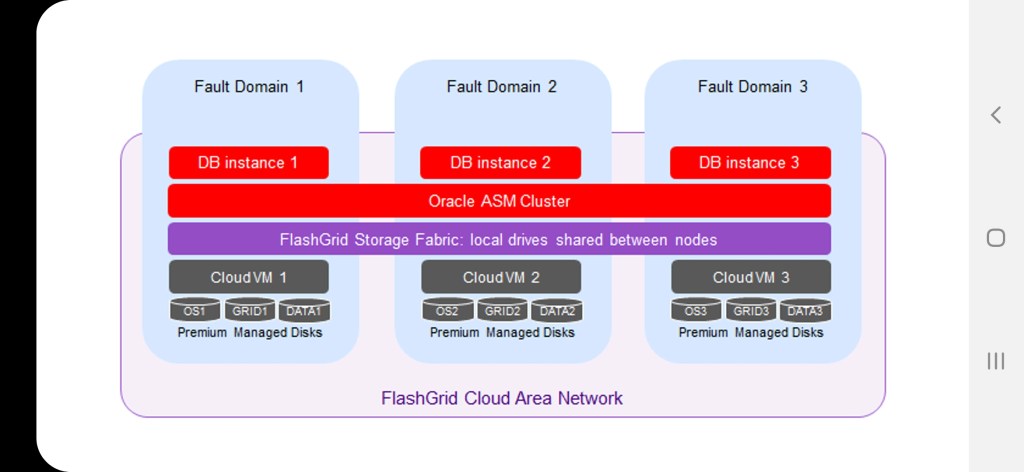
Flashgrid technology is the way to enjoy RAC instances in AWS, Microsoft Azure and GCP. Flashgrid cloud area network software and flashgrid storage fabric software enable running RAC clusters in Azure, AWS and GCP.
Some of basic flashgrid commands executed by customer DBAs
1. Verify health of the cluster: $ sudo flashgrid-health-check
2. Confirm that email alerts are configured and delivered: $ flashgrid-node test-alerts
3. Upload diags to FlashGrid support: $ sudo flashgrid-diags upload-all
4. Verify cluster status : $flashgrid-cluster
5. To check the current clock difference between the cluster nodes : $ flashgrid-cluster verify
6. To show details of the disk groups : $flashgrid-dg show
7. Stop FlashGrid services on the node. It will gracefully put the corresponding failure group offline, stop CRS, and stop Flashgrid services: #flashgrid-node stop
8. Reboot the node using flashgrid-node command. It will gracefully put the corresponding failure group offline: #flashgrid-node reboot
Both commands 7 and 8 should run after ensuring there are no other nodes that are in offline or re-syncing state. All disk groups must have zero offline disks and Resync = No: $flashgrid-cluster followed by stopping databases running on the concerned node(s).

 Orama.blog